
Memory Management in Python
How to free up memory in your work environment + a bonus tip!

If you work with huge datasets like me, you have probably encountered memory issues, which result in your development environment crashing or becoming unresponsive. As a data Scientist, I regularly collect, wrangle, analyze, and store huge datasets (typically from a Jupyter notebook, R Studio, or SAS Studio). I have found ways to perform memory-intensive tasks without problems.
Today, I will share a few tips to: (1) check your memory usage and (2) free up memory in Python. I will demonstrate the code from a Jupyter notebook, but you can apply these principles to any development environment and/or programming language. I will link my GitHub with the code at the end..

Why is memory management important?
Keeping track of memory usage can help you avoid crashing your environment, run your code faster and aid in analyzing large quantities of data. For example, if you try to create a dataframe that’s larger than the available memory, your environment will crash and/or your kernel will die.
How to check memory usage?
The memory used in your development environment includes built-in functions, objects, modules, variables, any code, variables and dataframes created. Python offers a variety of ways to check the total memory available and used. The ‘psutil’ package is a good one to use. To make things, simpler I have created a Python function called `check_memory`. You can specify the unit (bytes, GB, MB or TB) and the rounding decimals. The defaults are ‘GB‘ and .3 decimals. It also prints a timestamp.
check_memory()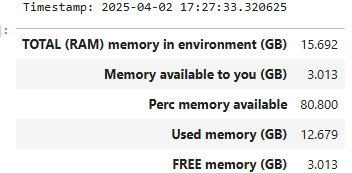
check_memory('mb', round_to=2)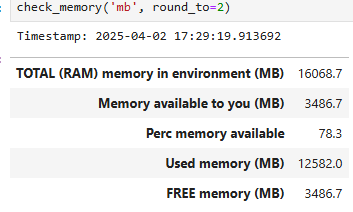
To check the memory used by a dataframe ‘df‘, run:
# memory usage by column
df.memory_usage()

# total memory usage by column
df.memory_usage().sum()
How to free up memory?
(1) Remove un-needed objects (files, dataframes, variables, …) from the memory and disk
You can do it manually or programmatically with :
# Files
!rm filename ## or !del filename

# other objects, for example a dataframe df
!del df
(2) Remove all variables from memory, except for those that are defined by the user in the configuration file.
Manually
In your development environment, there is typically a place to shut/reset and restart the environment. In Jupyter notebook, you can do so from the menu: `Kernel --> 'Reset`. Make sure you save the files you need beforehand.
Programmatically
%reset -fIf you are in the habit of saving intermediate results to a permanent storage like a cloud bucket, you can periodically perform these actions to free up memory for the next tasks.
(2) BONUS TIP: ditch CSV or Excel files for storage.
Instead use `.parquet` or `.feather` files for storage. They offer much better compression methods. Better yet, if you have write access to a relational database, write your results as a table there if they will be used frequently for more data analysis.
Happy coding!
GitHub with code for `check_memory()`. Please give me credit if using it. Thanks!